24GHz Occupancy detector with NO contact and NC contact with AC
input
1. Features
The sensor is an embedded type dry contact version of an occupancy
detector, which detects movement, slight motion, and breathing
signals as well, and can identify human/non-human.
The sensor adopts 24GHz high-gain large-beam millimeter-wave radar
technology, which is characterized by the realization of living
presence detection.
1) Adopt life-being detection technology, which can detect
movement, slight movement, and breathing signals, and realize true
presence detection.
2) Adopt the reed tube relay, no voice applied to the hotel.
3) Super small installation size, can be applied to smart
buildings, intelligent hotels, smart offices, presence detectors,
and other related intelligent control fields.
4) 24-24.25GHz (ISM band) millimeter wave radar. no interference to
5G WIFI and no penetration of detection signals through solid
walls.
2. Parameters
| Input/Output | Voltage Range | 220-240V AC 50HZ |
| Rated Voltage | 220V AC |
| Working Current | 50mA max |
| Working Power | ≤1W |
| Load Type | Resistive, voltage≤36Vdc, current:50mA max |
| Sensor Parameters | Working Frequency | 24GHz -24.25GHz,ISM band |
| Transmitting Power | 5mW Max. 3dBm Max. |
| Detection Area | 100% 75% 50% 25% (set by remote control MH10 or DIP Switches |
| Hold Time | 5s/30s /1min / 3min /5min /10min /20min (set by Remote) 5s/30s/1min/3min/5min(set by DIPs) |
| Daylight Sensor | 50Lux/Disable(set by DIPs) 5Lux/15Lux/30Lux/50Lux/100Lux/150Lux/Disable(set by remote control MH10) |
Detecting Range (100% detection area, radius) | Movement: 4-5m (at 3m height) Minor Movement: 4-5m (at 3m height) Presence: 3-4m (at 3m height) |
| Mounting Height | 2.5-4.0m, typical value 3m |
| 3db Beam Angle | 100°(XZ field) |
| 100°(YZ field) |
| Environment | Working Temperature | 0℃...+50℃ |
| Storage Temperature | -40℃...80℃ Humidity:≤85% (non condensing) |
| Certificate Standard | Certificate | FCC/RED |
| Environmental Requirement | RoHS |
| IP Rating | IP20 |
| Note: "N/A" means not available. |
3. Functions

Movement signals active Slight motion& Breathing signal maintain
The sensor detects human walking, slight motion(such as body
movement, turning the head, and other minor movements), and
breathing to realize the detection of human existence in a
non-sleep state.
* Movement signal: Big movement for sensor triggering within the detection area.
* Slight motion signal: very small movement can be collected within the detection area,
for example: leaning forward, leaning back, body swinging, shaking
his head, typing, playing with mobile phones, and other small
behavioral actions.
* Breathing signal: Detected breathing signal (abdominal cavity and chest cavity
dilation behavior)
4. Dimension (unit: mm)
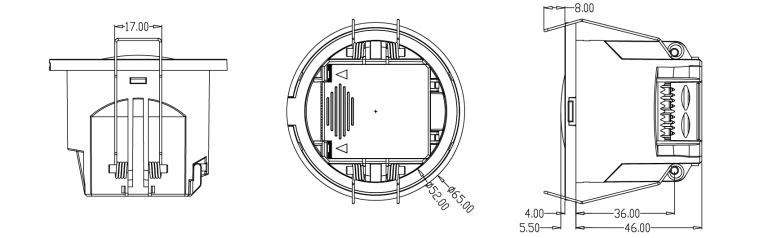
5. Wiring

6. Structure

7. Installation Instruction
1)Flush mounting

a.Cut a hole of 55 mm in the ceiling.
b.Remove the crimping cover using a flat-head screwdriver.
c.Connect the wire to the terminal.
d.Install the wire cover and press the wire.
e. Bend the spring clamp backward to push the pre-opened hole in
the ceiling.
f. Ensure stable and reliable installation.
2) Surface mounting

a. Cut off the reserved thin wall for the thread.
b. Fix the product on the target mounting surface with a matching
screw.
c. Connect the input wire to the wiring terminal, and close the
cover tightly.
d. Remove the top cover with a flat-blade screwdriver.
e. Adjust the dip switches and the parameters, and then cover the
top cover.
f. Push the product into the ceiling seat, and the buckle will
fasten the product to prevent it from falling off.
g. To separate the product from the ceiling seat, insert a
flat-blade screwdriver into the disassembly gap, lift the
screwdriver, and pry down with the tip; the product will pop out of
the ceiling seat.
h. Ensure stability and reliability after installation.
8. Detection pattern

Remark:
1) Due to the influence of electromagnetic wave transmission
characteristics, the detection range is related to the size of the
person, the material, and the thickness of the covering, and the
effective radar action range will change accordingly.
2) The electromagnetic wave in the millimeter wave frequency band
has certain penetration characteristics for non-metallic materials.
It can penetrate the common glass board screen and thin partition
wall and can detect the moving object behind the shield, but it
cannot penetrate the thick load-bearing wall and metal door.
9. Remote Settings
Remote control settings only support sensitivity, delay, ON/OFF,
reset, sensor motion, and indicator switch settings.

10. Initialization
When the first power is turned on, the sensor enters the self-test
mode, and the self-test will be completed after 20 seconds to enter
the normal working state. During the initialization, the external
motion signal will not be detected, remote control signal will not
be received.
11. Factory Settings
Detection Area:100% Hold Time:1min Daylight Sensor: Disable
Indicator light: open
12. DIP Settings
- Detection Area
| 1 | 2 |
| 100% | ON | ON |
| 75% | - | ON |
| 50% | ON | - |
| 25% | - | - |
- Hold Time
| 3 | 4 | 5 | |
| Ⅰ | ON | ON | ON | 5S |
| Ⅱ | - | ON | ON | 30S |
| Ⅲ | ON | - | ON | 1min |
| Ⅳ | ON | ON | - | 3min |
| Ⅴ | - | - | - | 5min |
- Daylight Sensor
*When set to “disable”, the lamp will switch on when it detects the
motion, no matter the ambient light level
13. Application notice
1. The product should be installed by a professional electrician.
2. The product should be kept as far away as possible from
large-area metal plates, glass, and other substances with high
medium density to avoid false triggering.
3. The antenna surface of the product and its nearby circuits
should avoid the flow of large currents, so as not to affect the
normal operation of the product.
4. When installing multiple products in one place, please try to
ensure that the antenna surfaces of the products are parallel to
each other and do not face each other. The installation distance
between products should be greater than 1m. Dense installation may
cause false reports.
5. The antenna surface of the product should avoid facing the AC
drive power supply, and stay away from the rectifier bridge,
transformer, switch tube, and other high-power devices of the drive
power supply, so as to avoid power frequency signals from
interfering with the microwave module.
6. Avoid using objects that vibrate for a long time around the
product, such as shaking head fans and so on. The vibration signal
will be regarded as a moving signal to trigger the product.
7. Avoid unnecessary lights illuminating the product's illuminance
sensor detection window and interfering with the measurement of
ambient light.
8. The microwave sensor has an ability to penetrate the building
wall, and the microwave that penetrates outside the wall may cause
false triggering when it detects moving objects. In order to avoid
false triggering, when installing, please choose an appropriate
detection area, for example:
A. When the product is used in a room whose length and width are
about 2m or less, the detection area should be set to
25%(application scenes: washroom, sitting room ).
B. When the product is used in a room whose length and width are
about 3m, the detection area should be set to 50%(application
scenes: washroom, hallway, sitting room );
C. When the product is used in a room whose length and width are
about 4m, the detection area should be set to 75%(application
scenes: small office, meeting room, library );
D. When the product is used in a room whose length and width are
about 5m or more, the detection area should be set to
100%(application scenes: large office, meeting room, library ).
Note: The setting detection area depends on the actual environment(
detection area parameters above application scenes are for
reference only).
9. The detection distance is related to the moving speed of the
moving object, the size of the moving object, the installation
height, the installation angle, whether the installation
environment is empty, the material of the reflector, and other
factors. The detection distances given in the specification are
typical values, which are obtained by testers at a height of 165cm
and a weight of 65 kg, and tested in an indoor open environment.
10. Product specifications and parameters may be optimized without
prior notice.


